
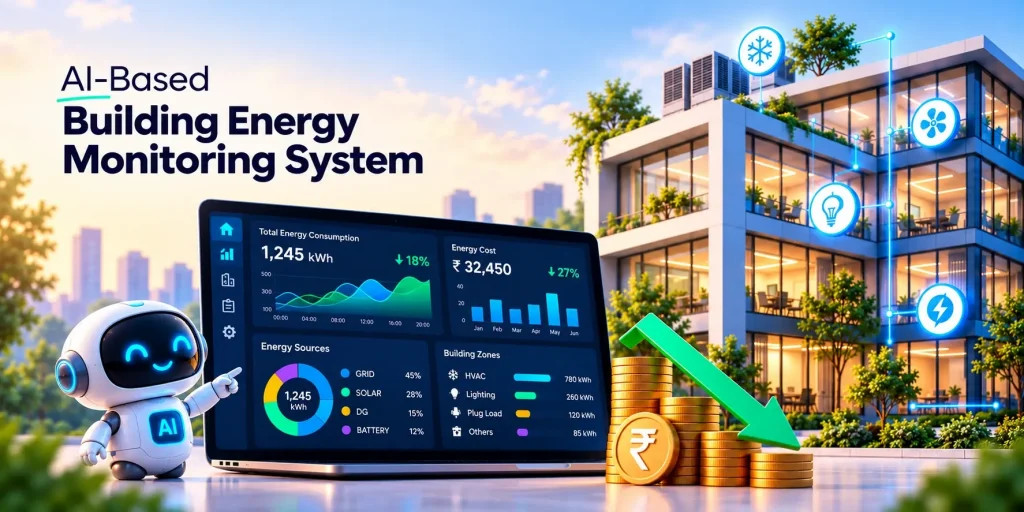
Have you noticed your building’s electricity bill keeps rising even when nothing seems to have changed? The same building facilities, the same equipment, and similar weather, yet the utility bill shows a different number every month.
The reason is usually hidden in places where we never know what is happening in building facilities and assets. No one is looking at an air handling unit running past office hours, a chiller slowly losing efficiency, lights left on in parking areas and corridors, or a water supply motor running long after the overhead tank is full, and other electric devices running continuously without taking care of their maintenance and faults.
In hotels, hospitals, offices, and malls, the list grows even longer, with lifts and escalators running at full capacity through quiet night hours, refrigerators and cold rooms working harder because of faulty door seals, and ACs, geysers, and lights left on in vacant guest and patient rooms. Since the monthly bill shows only a total, these problems stay invisible until they become expensive monthly bills.
AI-based building energy monitoring brings them into transparent operations. Using IoT sensors and artificial intelligence, it shows exactly where, when, and why energy is being used, and flags anything unusual the moment it happens.
In this guide, you’ll learn why commercial buildings face high energy costs, why traditional monitoring keeps missing the problem, and how an AI-based system helps cut those costs.
Why Do Commercial Buildings Have High Energy Costs?
Commercial buildings have high energy costs mainly because HVAC, lighting, and plug loads run longer and harder than occupancy requires. Inefficient equipment, demand penalties, and poor power factor add to the problem. Most of this waste stays hidden because buildings lack real-time, equipment-level visibility.
The US EPA’s ENERGY STAR program estimates that around 30% of the energy used in commercial buildings is wasted. In India, commercial tariffs, maximum demand charges, and power factor penalties make that waste even more expensive. They pay energy bills which were never used to run the facilities in their building.
Common Causes of Energy Waste in Commercial Buildings
- HVAC running on fixed schedules: AHUs and chillers keep cooling empty floors after hours and on weekends.
- Lighting left on unnecessarily: Without sensors or scheduling, corridors, washrooms and parking areas stay lit overnight.
- Constant after-hours load: Servers, pumps, water heaters and signage keep drawing power when the building is empty.
- Undetected equipment faults: Fouled chiller tubes, clogged filters and refrigerant leaks quietly increase power consumption.
- Peak demand spikes: Starting chillers, lifts and pumps together can exceed contract demand and lead to penalties.
- Poor power factor: A low power factor raises kVA and adds to utility charges.
- Expensive DG set usage: Diesel power costs far more than grid supply, and runtime is rarely monitored.
- Operational and behavioral issues: Forgotten manual switching, conflicting setpoints, low thermostat settings, and open windows with the AC on.
Limitations of Traditional Energy Monitoring
- Infrequent manual readings: Daily or monthly readings are too coarse to show when or where energy is wasted, and manual entry invites errors.
- Disconnected Data Sources: BMS, meters, DG sets, solar inverters, and utility bills sit in separate systems, with no unified view.
- Context-blind alarms: A fixed limit like “alert above 200 kW” cannot tell a busy weekday afternoon from a Sunday night.
- Delayed peak demand visibility: Spikes appear only on the monthly bill, after the penalty is already set.
- Periodic audits: Faults that begin after an audit stay hidden until the next one.
- No predictive insight: Cannot forecast demand peaks, warn of equipment failure or recommend corrective action.
- Data without analysis: Thousands of daily readings are collected, but few turn into action.
Why Monthly Electricity Bills Cannot Reveal Real-Time Energy Waste
A monthly electricity bill gives you only one total, showing how much energy your building used in 30 days. But it does not tell you when the waste happened, which equipment caused it, or whether the problem is continuing.
Real-time energy monitoring fixes this gap. It tracks consumption by hour and by equipment, alerts your team the day a problem starts, and shows within days whether a fix worked. You stop guessing from a bill and start acting on live data.
What Is an AI-Based Building Energy Monitoring System?
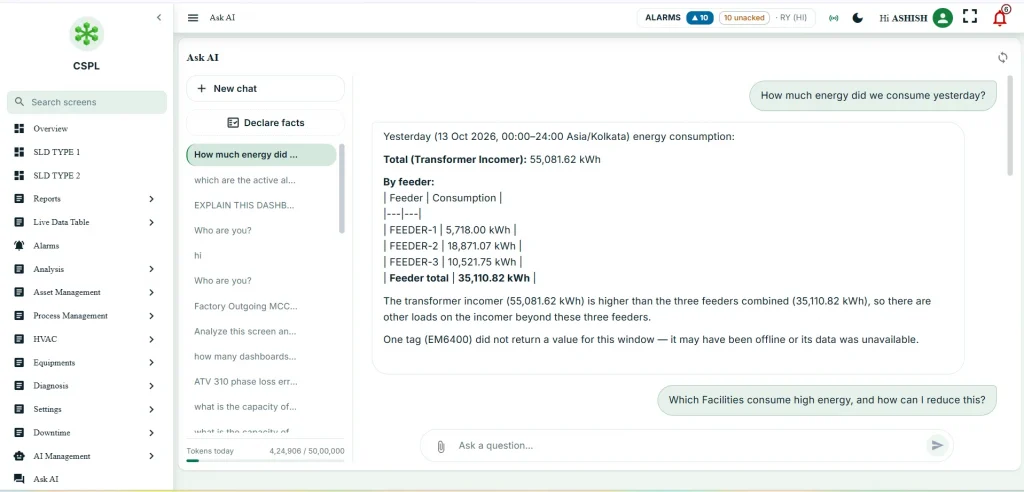
An AI-based building energy monitoring system collects real-time data from smart meters and IoT sensors, then uses machine learning to find energy waste, detect equipment faults, track maximum demand and power factor, and forecast peak loads. It does not just display readings. It explains what changed, where, and what to fix, so your team acts before the next bill arrives.
IOTMATRIX’s Energymatrix platform puts this intelligence in every team member’s hands. Its AI chatbot answers questions like “Which floor used the most power last night?” in plain language, using your live building data. With Energymatrix, you cut electricity costs, avoid demand and power factor penalties, and keep savings in place.
Your building has the answers. Now you can just ask.
Get instant answers to all your energy questions with the EnergyMatrix AI chatbot.
Try the AI Chatbot NowHow AI and IoT Work Together in Building Energy Monitoring
IoT collects the data, and AI turns it into decisions. Smart meters and sensors on your HVAC systems, lighting, and other electrical equipment measure power, current, voltage, and power factor in real time, then send that data to the cloud every few seconds. Without IoT, AI has nothing to analyze.
AI analyzes the data, learns what normal consumption looks like, and pinpoints where the problem has gone wrong. It detects energy waste, flags faulty equipment, and predicts peak demand, so your team acts on clear insights instead of raw numbers.
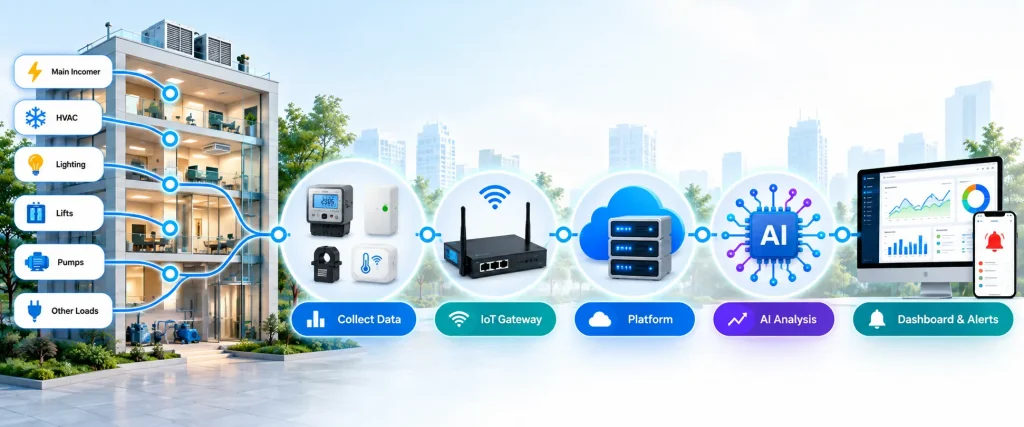
The process in five steps:
- Sense: Smart meters and IoT sensors collect energy data from HVAC, lighting, voltage, and other equipment.
- Transmit: IoT gateways send the data to the platform using Modbus, MQTT, or BACnet.
- Store: The platform saves real-time and historical data for comparison.
- Analyze: AI detects unusual consumption and energy waste, and predicts peak demand and its cost.
- Act: The system sends alerts, energy-saving actions, and runs automatic control.
Key Components of a Building Energy Monitoring System
- Smart meters and CT sensors: Measure power, current, voltage, and power factor at the main incomer, sub-panels, and key equipment.
- Environmental and Occupancy Monitoring: These capture the conditions inside and outside your building.
- IoT gateway and communication network: The gateway collects data over wired links (RS-485, Ethernet) and wireless links (Wi-Fi, 4G, 5G, LoRaWAN) using Modbus, BACnet, or MQTT, then sends it securely to the platform.
- AI-powered energy management software: Stores every reading and turns it into dashboards, reports, benchmarks, anomaly alerts, and demand forecasts.
- Actuators and switched outputs: Relays, contactors, smart switches, and valve or damper actuators carry out the controller’s commands, so the system switches off idle equipment and sheds non-critical loads without manual effort.
- Cloud or On-Premise Platform: Stores and processes energy data on cloud servers or local servers for monitoring and analysis.
- Automation controllers: These run the control logic on site. Direct digital controllers (DDCs) manage HVAC, and programmable logic controllers (PLCs) manage pumps, motors, and process equipment. They follow schedules, setpoints, and AI recommendations, and they keep equipment running perfectly even if the network goes down.
- AI chatbot and BMS integration: Anyone on your team can ask the chatbot a plain question like “Which floor used the most power last night?” and get an answer. BMS integration lets the platform act on your existing building systems.
How Does an AI-Based Building Energy Monitoring System Work
Collecting Real-Time Energy Data from Smart Meters and Sensors
Smart meters are installed at the main incomer, on distribution boards, and at individual loads such as HVAC units, lighting circuits, lifts, and pumps. They record electrical readings at set intervals. Depending on the meter, these readings can include voltage, current, power factor, active power (kW), apparent power (kVA), energy consumption (kWh), and harmonics.
Numbers from meters don’t explain why consumption changes, so the system also pulls in other inputs. Sensors can measure temperature, humidity, occupancy, and CO₂ levels. Weather data and electricity tariff schedules add further context for understanding shifts in demand.
IoT gateways then send all of this data to a cloud or on-premise platform through supported communication protocols. The platform timestamps the readings, validates them, and organizes them, so the monitoring and analysis that follow rest on reliable data.
Monitoring Power Consumption, Energy Usage, and Maximum Demand
Once the data reaches the platform, it appears on a centralized dashboard in both real-time and historical views. Facility managers can track electricity use across floors, departments, tenants, and individual pieces of equipment.
Two basic measurements sit at the center of this view. Power consumption, measured in kilowatts (kW), shows how much power a building or device draws at a given moment. Energy usage, measured in kilowatt-hours (kWh), shows the total electricity consumed over a period of time.
Maximum demand is another key figure; it is the highest demand recorded during the applicable billing interval, and it matters because demand charges can make up a significant part of a commercial electricity bill, depending on the tariff and billing arrangement. The system also monitors power factor, which helps reveal inefficient electrical usage and potential power quality issues.
With these parameters in view, facility managers can spot high-consumption periods, compare the performance of similar equipment, and take steps to keep peak demand under control.
Analyzing Energy Consumption Patterns Using AI
This is the stage where AI adds value beyond standard metering; it analyzes real-time and historical data to understand how the building uses electricity under different conditions, such as occupancy levels, operating hours, weather, and seasonal changes.
Machine learning models use this history to build consumption baselines and then identify deviations from expected usage. For example, if an HVAC system keeps drawing power overnight while the building is empty, the system flags the pattern for investigation instead of letting it continue unnoticed.
AI can also forecast energy demand and point out opportunities to improve HVAC schedules, optimize pump operation, and move flexible loads to lower-tariff periods where the tariff allows it. The quality of these insights depends on reliable data, suitable models, and accurate operating information, so a well-maintained metering setup makes a real difference.
Detecting Abnormal Energy Consumption and Generating Alerts
After the baselines are in place, the system compares actual consumption against configured thresholds and expected usage patterns. Any unusual change gets flagged.
Typical examples include HVAC systems running outside scheduled hours, sudden increases in electrical load, excessive overnight consumption, and demand approaching a defined limit. Alerts appear on the monitoring dashboard or reach the team through supported notification channels. Facility managers can then check the affected equipment and take corrective action.
Some platforms go a step further: when integrated with compatible control systems, they can support automated HVAC scheduling, load management, and peak demand control, so the building responds to problems without waiting for someone to step in.
How AI Identifies Energy Waste and Predicts Building Energy Demand
A building rarely announces that it is wasting energy. A damper sticks, a schedule override stays on, or a chiller loses efficiency, and the only symptom is a higher bill. AI exposes these hidden losses by learning how the building should behave and flagging every departure from it.
Level 1: Collecting and Cleaning the Building’s Data
Sensors and smart meters record temperature, humidity, CO₂ (a stand-in for occupancy), and kWh use every 1 to 15 minutes, while submeters show which system drives a rise in consumption. The system adds weather, calendars, and grid signals such as time-of-use tariffs and carbon intensity. A cleaning pipeline then fills gaps, removes impossible values (like 100°C in an office), aligns timestamps, and scales variables. Brick Schema and Project Haystack label sensors consistently, so one AI can serve many buildings.
Level 2: Constructing Multivariate Model Inputs from Building Telemetry
Engineers convert raw timestamps into inputs the model can learn from. Sine and cosine encoding of hour, weekday, and month teaches it that 11 p.m. sits next to midnight. Historical data features, such as the previous hour and the same hour yesterday, give it momentum, and rolling averages smooth brief spikes while reflecting the building’s slow thermal response. Domain features such as degree-hours, indoor-outdoor temperature gaps, and occupancy estimates add physical knowledge.
Level 3: Training the Model to Learn Expected Consumption
The goal is a model of expected consumption that shows how much energy the building should use under given conditions. This one model powers both waste detection and forecasting.
Engineers train on one to two years of earlier data and test on a later period, because random shuffling leaks the future and inflates accuracy. The model guesses, measures its error, and adjusts its weights repeatedly until predictions match reality, with accuracy judged by CV(RMSE) and NMBE from ASHRAE Guideline 14.
Model choice: Gradient-boosted trees (XGBoost, LightGBM) for a fast, explainable start; LSTM or Transformer models for longer horizons; physics-informed “grey-box” models when data is scarce.
New buildings: Transfer learning fine-tunes a model from similar buildings with a few weeks of local data.
Level 4: Detecting Waste and Predicting Demand in Real Time
The trained model runs continuously in the cloud or on an edge device near the controls. It compares measured use with expected use, and the gap, called the residual, triggers alerts. At 2 a.m., for example, the model expects 40 kW and the meter reads 95 kW, and submeter data traces the excess to an air handler left running by a schedule override. Thresholds catch big spikes, and CUSUM catches small, persistent drifts.
SHAP then shows what drove each alert, and each fault is costly in energy, money, and carbon so teams fix the costliest first. The same model forecasts the next 24 hours of load, ideally with a confidence range, so a heatwave due at 2:00 PM can trigger pre-cooling at 6:00 AM on cheaper, cleaner power.
How to Reduce Building Energy Costs Using AI-Based Energy Monitoring
AI-based monitoring cuts costs by showing where energy goes, when it goes there, and what can change. Each of the six areas below targets a different source of avoidable spending.
Identifying Hidden Energy Waste and Unnecessary Consumption
Most waste goes unnoticed because it produces no breakdown or complaint. AI compares actual use with expected use and flags the gap. It catches leaking valves, heating and cooling running at the same time, and drifting sensors, then ranks each fault by cost so teams fix the biggest losses first.
Optimizing HVAC Energy Consumption Based on Building Usage
HVAC is usually the largest energy user, and it often runs on fixed schedules that ignore real occupancy. AI uses occupancy, CO₂ levels, and weather forecasts to adjust temperature setpoints and ventilation to actual need. It also pre-cools or pre-heats the building before demand arrives, so equipment works steadily instead of straining at peak.
Reducing Energy Waste from Lighting and Electrical Equipment
Lights, computers, and plug loads left on in empty areas add up over a year. Circuit-level monitoring shows which zones and devices keep drawing power when unused. AI learns each space’s normal pattern, flags the exceptions, and can trigger automatic shutoff or dimming.
Monitoring Peak Demand to Help Control Electricity Charges
Many utilities bill based on the highest demand spike in a billing period, so one short surge can raise the whole month’s charge. AI forecasts these peaks and responds early by staggering equipment start-up, shifting flexible loads, or drawing from batteries. Flattening the peak lowers the demand charge without reducing comfort.
Reducing After-Hours Energy Consumption
Nights and weekends should have a low, predictable baseline. AI measures that baseline and alerts staff when it rises, for example, when an air handler runs overnight because of a forgotten schedule override. Fixing these cases is often the quickest win, since no one is in the building to benefit from the energy used.
Using Predictive Energy Analytics to Improve Operational Decisions
Beyond daily alerts, the data supports bigger decisions. Managers can compare buildings, test whether a retrofit paid off, and plan maintenance before equipment fails. Verified savings figures also make it easier to justify the next investment and to track progress toward cost and carbon targets.
How IoT Sensors and Building Automation Systems Enable Energy Optimization
AI can only optimize what it can see and control. IoT sensors supply the data, and building automation systems (BAS) carry out the actions. Together, they form the link between the AI’s decisions and the physical equipment.
Submetering Energy Consumption Across Equipment and Building Areas
A single whole-building meter shows how much energy is used but not where. Submeters on chillers, air handlers, lighting circuits, floors, and tenant spaces break the total into parts. This lets AI pinpoint which system caused a rise in consumption, compare similar equipment, and allocate costs fairly between tenants or departments.
Integrating Smart Meters, HVAC Controllers, and Building Systems
Smart meters report how much energy the building uses, while HVAC controllers report what the equipment is doing, such as valve positions, fan speeds, and setpoints. Lighting, occupancy, and security systems add further context. When these sources are combined, AI can link a spike in consumption to its cause, for example, a fan running at full speed in an empty zone.
Connecting Building Equipment Through BACnet, Modbus, and MQTT
Equipment from different manufacturers has to speak a common language before data can flow into one platform. BACnet is widely used for HVAC and building controls, and Modbus is common for meters, drives, and industrial equipment. MQTT is a lightweight messaging protocol that moves sensor data efficiently to cloud platforms. Gateways translate between them, so older and newer equipment can share one system.
Monitoring and Control Through a Centralized Energy Dashboard
A centralized dashboard brings all this data into one view. Facility teams can track live consumption, see alerts ranked by cost, compare buildings, and review trends. Where the system allows, they can also adjust schedules and setpoints from the same screen, so a problem found in the data can be corrected right away.
What Features Should Building Energy Monitoring Software Include?
The right software does more than display numbers. It should show what is happening now, warn about problems early, report progress clearly, and connect to the equipment that uses the energy. These four features cover those needs.
Real-Time Energy Monitoring and Custom Dashboards
Live data lets teams see consumption as it happens instead of finding problems on next month’s bill. Good software updates every few minutes and shows electricity, gas, and water use by building, floor, or system. Custom dashboards matter because different users need different views: a facility manager wants alerts and equipment status, while an executive wants cost and carbon trends.
AI-Based Energy Analytics and Predictive Alerts
The software should learn each building’s normal behavior and flag unusual use automatically. Predictive alerts go a step further by warning about peak demand, equipment decline, or rising after-hours use before they become costly. Look for alerts that explain the likely cause and estimate the cost, so teams know what to fix first and why.
Automated Energy Reports and Performance Tracking
Manual reporting takes time and invites errors. The software should produce scheduled reports on consumption, costs, savings, and carbon emissions without extra effort. Performance tracking against baselines, budgets, and targets shows whether a retrofit or operational change actually paid off, which supports both internal decisions and compliance or sustainability reporting.
Equipment-Level Monitoring and System Integration
Whole-building totals hide where the waste is, so the software should track individual equipment such as chillers, air handlers, pumps, and lighting circuits. It should also connect easily to existing meters, sensors, and building management systems through open protocols such as BACnet, Modbus, and MQTT, or through APIs. Strong integration avoids isolated data and makes it possible to act on insights, not just view them.
Which Commercial Buildings Can Benefit from AI-Based Energy Monitoring?
Buildings with high energy use, long operating hours, or changing occupancy gain the most. Each of the four groups below has a different pattern of waste, and AI addresses it differently.
Office buildings and corporate campuses: AI adjusts HVAC and lighting to actual occupancy, catches after-hours waste, and compares floors or buildings to show where energy is being lost.
Shopping malls and retail facilities: AI forecasts busy and quiet periods, spots refrigeration faults early, trims demand peaks, and helps allocate energy costs fairly among tenants.
Hotels, hospitals, and educational institutions: AI cuts energy use in vacant rooms and unused spaces while keeping comfort and safety standards intact, and flags early signs of chiller, boiler, or air handler decline.
Large and multi-site facilities: Warehouses, factories, data centers, and multi-location organizations see strong returns because small savings add up at scale, and one platform lets managers compare sites and focus investment where it pays off most.
Benefits of a Building Energy Monitoring System
1. Reduce Utility Costs
Real-time monitoring and control shows where energy is wasted, such as after-hours use and peak demand spikes and prevents the high energy consumption. Fixing these cuts the bill upto 30% without any major facility upgrades.
2. Improve Operational Efficiency
Changes in energy use often signal failing equipment early. Teams can repair problems before breakdowns and focus on the faults that majorly happen.
3. Make Data-Driven Decisions
Reliable data lets managers compare buildings, verify retrofit savings, and justify future investments with measured results.
4. Automated Operational Management and Control
The system adjusts schedules and setpoints based on occupancy and weather, within comfort and safety limits, so the building stays efficient around the clock.
5. Remote Monitoring With AI Chatbot
A cloud dashboard and AI chat assistant let teams check live consumption and ask cost questions in any language, from anywhere.
How to Choose the Right Building Energy Monitoring System Provider
Choosing a provider is a multi-year commitment. Before you contact vendors, define your goals, such as cutting energy costs, meeting a building performance standard, reporting emissions, or preventing equipment failures. Then score every provider against them.
Evaluating AI Analytics and Energy Monitoring Features
Start with the data. The system should record consumption at the meter and submeter level every 15 minutes or faster, and cover electricity, gas, water, and steam. Without submeters on HVAC and lighting, you see that your bill is high but not why.
Then ask what the analytics actually do. Many vendors use “AI” loosely, so confirm that the system provides:
- Anomaly detection that flags unusual use, such as a chiller running overnight
- Fault detection that identifies specific problems, such as simultaneous heating and cooling
- Forecasting of load and peak demand to avoid demand charges
- Ranked recommendations with estimated annual savings
- Weather and occupancy normalization to verify savings
Test these claims with a live demo on your own data or a 60 to 90 day pilot at one site. Count the alerts, the false alarms, and the fixes that result.
Checking Compatibility with Existing Building Equipment
Choose a provider that works with the meters, sensors, and systems you already own. This avoids costly replacements and vendor lock-in.
- Protocols: Confirm support for BACnet, Modbus, LonWorks, MQTT, or OPC UA.
- Hardware: Check that current meters are accepted, and ask about wireless sensors and clamp-on current transformers for older buildings.
- Data access: Require open APIs, data ownership, and standard export formats.
- Security: Look for ISO 27001 or SOC 2, encryption, and role-based access.
- Installation plan: Get it in writing, with downtime and commissioning responsibility.
Comparing Implementation Costs, Scalability, and Reporting
Compare providers on total cost, room to grow, and report quality, not just the first quote.
- Costs: Get itemized quotes and add them over five years, including renewal terms and exit costs.
- Scalability: Ask the price of adding 50 meters or five buildings, and confirm multi-site dashboards.
- Reporting: Check for operating, cost, and GHG Protocol-based emissions reports.
- References: Call three similar customers to confirm savings claims.
- Scoring: Rate each vendor from 1 to 5 against weighted criteria.
What Makes IOTMATRIX the Smart Choice for Building Energy Management?
Managing energy and other assets in a commercial building often means dealing with separate vendors for meters, software, integration, and support. IOTMATRIX removes that hassle with a complete, end-to-end solution under one roof as BuildingMatrix. We study your building, identify high-consumption assets, and connect equipment like HVAC, chillers, lifts, water pumps, cold rooms, DG sets, and lighting to our Smart AI Industrial Suite, which detects waste, forecasts demand, and flags faults early.
Your team gets live dashboards, real-time alerts, automated reports, and an AI chatbot that answers all your facilities questions instantly. Our support continues after installation to help you achieve lasting savings. With one team handling everything, you get faster setup, seamless integration, and a single point of accountability.
Turn Hidden Energy Waste into Real Savings with AI
Every commercial building runs on hundreds of assets working at the same time, from chillers and AHUs to lifts, water pumps, cold rooms, and lighting. When even a few of them run longer or harder than they should, energy costs climb quietly in the background. The challenge has never been a shortage of equipment or effort. It has always been the lack of clear, timely insight.
AI-based building energy monitoring gives facility teams that insight. It tracks every major asset in real time, understands what normal looks like for your building, and alerts your team the moment something goes off track. It forecasts demand before it peaks, flags HVAC faults before they become breakdowns, and shows exactly how much each improvement saves. Energy management moves from guesswork and monthly surprises to everyday control.
For hotels, hospitals, offices, and malls, this shift brings more than lower bills. It means longer equipment life, fewer unexpected failures, more comfortable occupants, and a stronger step toward sustainability goals.